
FAQ
Questions
 1.Q: Do you provide telephone-based support?
2.Q: I'm still having problems. Help me.
3.Q: How do I connect up a WBO2 controller to the FC-HAKO?
4.Q: Which WBO2 controller does the FC-HAKO work with? Which one do you recommend?
5.Q: My FC-HAKO does not work or stopped working!
6.Q: Does the FC-HAKO support connecting the hand controller at the same time as a laptop?
7.Q: Is any software provided with FC-HAKO?
8.Q: Do you provide support for the tuning software?
9.Q: I want a simple tool to check the communications with the PowerFC. Is there one available?
10.Q: I have tried Copilot, it somewhat works, but it always does a soft-reset. What gives?
11.Q: How does this compare to the datalogit hardware interface?
12.Q: I have seen some other cable solutions from Japan. Are they any good?
13.Q: What's the difference between FC-HAKO and Kashima's communication adapter?
14.Q: FC-HAKO does not work with a specific PowerFC that I have. What gives?
Answers
1.Q: Do you provide telephone-based support?
1.A: No. However, email support is provided as part of purchasing FC-HAKO.2.Q: I'm still having problems. Help me.
2.A: If you happen to have an SR20DET-based PowerFC, you may need to reconnect USB cable if software detection failed. Unfortunately, this appears to be a common (unknown firmware-related) problem with the SR20DET-based PowerFC.Also, FC-HAKO may not work reliably if:
• the version of PowerFC is old, such as SR20 v1.70B or RB26 v3.11 (known old variants so far)
• pre-2009 Prolific drivers are installed; please upgrade to latest version.
• using windows 7 "XP-mode".
• drivers from other devices is also installed. (eg: mobile phone serial comms cable).
• tuning software is set to auto-detect COM port.
• using vmware fusion virtualisation and removing USB cable while software is still running, resulting in non-responsiveness of guest operating system.
3.Q: How do I connect up a WBO2 controller to the FC-HAKO?
3.A: Since firmware v1.06, FC-HAKO supports and recommends differential input mode only. For more information, please read the FC-HAKO WBo2 Installation and Setup Guide as each wideband controller has different number of outputs, different out names, and different wiring colour! Do NOT CONNECT any signal or +5V wires to ground / black wire of FC-HAKO. Doing so will render FC-HAKO useless and will VOID WARRANTY.4.Q: Which WBO2 controller does the FC-HAKO work with? Which one do you recommend?
4.A: They will all work since the output will be between 0V-5V. it's a matter of how the hardware is calibrated to the software, or the software calibrated to the hardware. Please refer to the WBO2's manual for further information.The best choice for WBo2 controller is the Innovate LC-1, together with optional gauge.
5.Q: My FC-HAKO does not work or stopped working!
5.A: Number one thing to remember is not to spend 10 hours figuring out the problem _then_ emailing for assistance. It is also best to take a don't-think-you're-smarter-than-the-problem approach, otherwise the problem will always win.The main thing to do is to:
• download the FC-HAKO debug tool and run it in "test" mode. This will show whether communications works.
• send the output to sales at fc-hako.com so analysis can be performed.
In the mean time:
• Check if tuning software is NOT set to auto-detect COM port (Setup => Port).
• Check Device Manager under the 'Ports (COM & LPT)' subtree. There should be a device called 'Prolific USB-to-Serial Comm Port (COM#)'.
• Check that no other software is running that is taking over the COM port.
• Check if the mini-DIN (PS/2-like) plug to the FC-HAKO is firmly in place, aswell as to the PowerFC.
• Make sure the DB9 connector is tightly screwed in.
• Make sure you do NOT pull on the "PS/2" cable, but rather hold the "PS/2" connector to remove it.
• Disconnect and reconnect the USB cable to power cycle the FC-HAKO.
• If all else fails, email us with what you did and did not do, then follow directions exactly and verbosely to isolate the problem.
6.Q: Does the FC-HAKO support connecting the hand controller at the same time as a laptop?
6.A: No. This is not a supported nor designed feature. Please have a read what PaulR33 has to say here.7.Q: Is any software provided with FC-HAKO?
7.A: NO software is provided or included - only the hardware interface is supplied. FC-HAKO has been designed to work with official and third party software, as well as anyone who would like to write their own software.8.Q: Do you provide support for the tuning software?
8.A: We do provide support and attempt to best answer your questions. For very specific tuning questions, they should be directed to the forums:• Copilot by Kevin Beane.
• FC-Tune by Andre Buenger. (fasthatch)
• FC-Edit newcelica.org tuning guide.
9.Q: I want a simple tool to check the communications with the PowerFC. Is there one available?
9.A: Steps:• Download FC-HAKO-debug.exe.
• Connect FC-HAKO to the car and the PC. Start IGN.
• Run FC-HAKO-debug.exe COMX test, where COMX is the USB port (serial port) you have connected the FC-HAKO.
• The debug tool sends 10 commands to the PowerFC then repeats the process by sending each command 32 times.
Each dot represents success. Any other character represents failure.
10.Q: I have tried Copilot, it somewhat works, but it always does a soft-reset. What gives?
10.A: Verify that your PowerFC version string (exact) is listed as supported. If not, CoPilot will always default to AFM-based engines. If you happen to have a MAP-based engine, Copilot will continuously fail with a soft-reset. This is NOT caused by FC-HAKO.11.Q: How does this compare to the datalogit hardware interface?
11.A: datalogit per-say is a hardware and software solution, so it is not fair to compare it on that level. So to compare it to datalogit's FC-Box:• FC-HAKO provides an integrated USB serial interface, without the need of an USB-to-RS232 converter.
• FC-HAKO is firmware upgradable to resolve obscure communication bugs and issues.
• FC-HAKO works with all software specific to PowerFC.
• FC-HAKO provides only two analog inputs and no switch outputs.
• FC-HAKO does not provide a hand controller output.
12.Q: I have seen some other cable solutions ( yahoo jp cables and PFCLinker ) from Japan. Are they any good?
12.A: It depends if you are happy with the following limitations:• comes without professional case. For example, PFCLinker3.
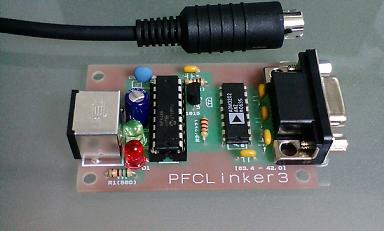
• requires the use of an extension cable, due to larger-than-required connector plug.
• it is more expensive than the FC-HAKO.
• it supports only X001-based Power FCs.
• it supports only FC-Pro software.
• it does not have analog (ADC) input.
13.Q: What's the difference between FC-HAKO and Kashima's communication adapter?
13.A: Kashima's hardware is a perfect drop-in replacement of Power Excel hardware as it supports 4 analog inputs, including exhaust temperature input (with signal amplification and adjustment) which is used by FC-Pro. But there are a couple of negatives, and that is it only works with FC-Pro software, plus the package is costly (~500-750 AUD). FC-HAKO will work with FC-Pro but you will not be able to utilise 4 analog inputs. FC-HAKO will also work with third party software, which is lacking from Kashima's hardware interface.14.Q: FC-HAKO does not work with a specific PowerFC that I have. What gives?
14.A: Apexi, back in the old days, first introduced PowerFC without supporting connection to a computer. This explains why later 1996-1998 PowerFCs have "FC-Pro" stickers on them, to show that they worked with official software, and the ones without "FC-Pro" stickers, did not work with software.FC-HAKO does NOT support the following PowerFC variants:
• Nissan SR201, date 9608, firmware 1.70B
• Nissan RB26, date 96??, firmware 3.11